@xlwvu7mx
I don't think it's a cable length issue or a DTS problem. Have you tried testing with a different adapter board or a different mainboard? I tested it with an Orange Pi CM5, using a 50cm FFC cable plus a 20cm FPC cable, and the image was very stable.

Posts made by veye_xumm
-
RE: GX-MIPI-IMX662 on RK3588 with Kernel 6.1 - MIPI CSI Errorsposted in Rockchip App camera
-
RE: GX-MIPI-IMX662 on RK3588 with Kernel 6.1 - MIPI CSI Errorsposted in Rockchip App camera
@xlwvu7mx
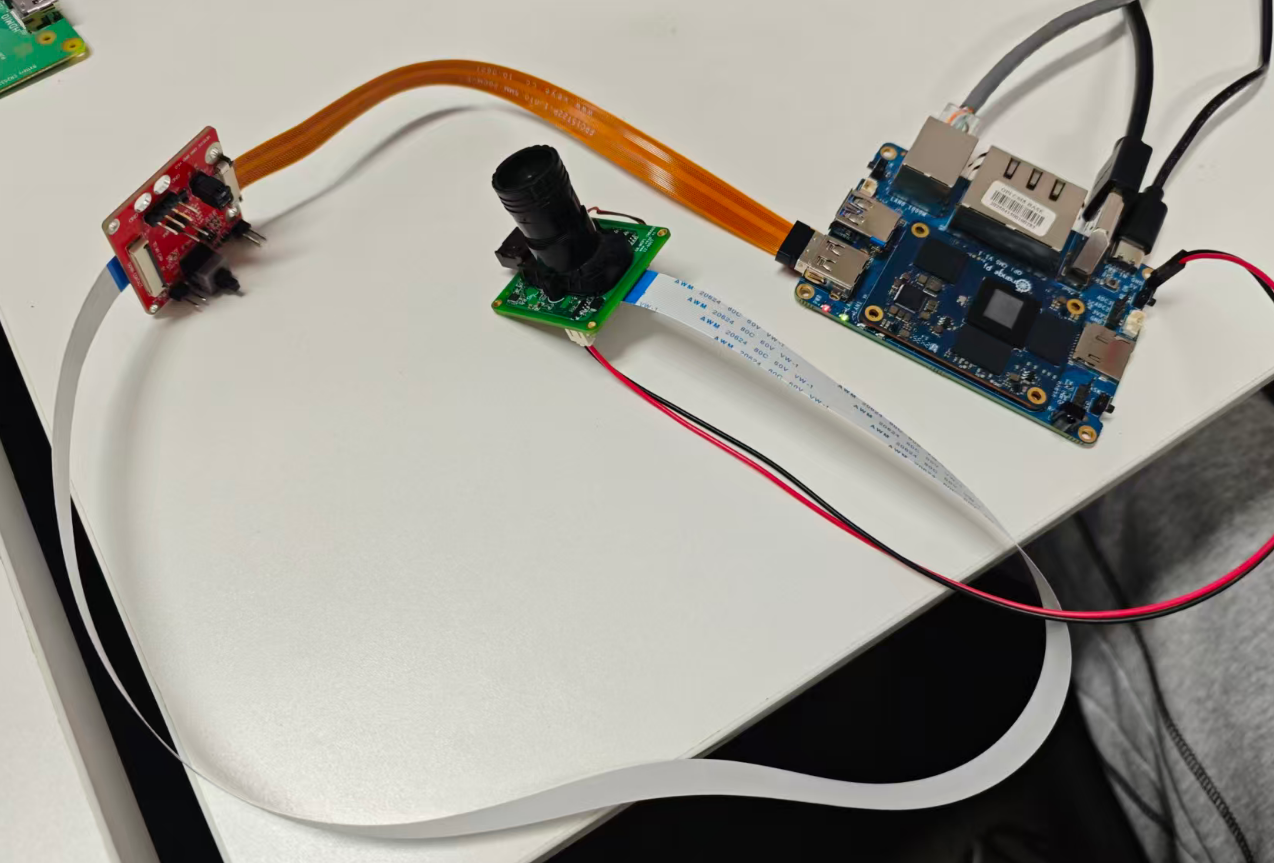
Based on our experience, under normal circumstances an FFC cable length within 50 cm does not cause any issues. We have tested a setup with a 20 cm FFC cable + an adapter board + a 50 cm FFC cable, and it worked normally. Could you please provide some photos of the actual setup so we can take a look? -
RE: GX-MIPI-IMX662 on RK3588 with Kernel 6.1 - MIPI CSI Errorsposted in Rockchip App camera
@xlwvu7mx
Hello, the MIPI data rate of the GX series products is indeed higher than that of the VEYE series: GX: 1188 Mbps, VEYE: 594 Mbps. Based on the issues you are experiencing, I mainly suspect the MIPI signal quality. Please pay special attention to the following:-
What is the length of your FFC cable?
-
About your adaptor board:
- Have the differential pairs been length-matched? (This is required.)
- Has impedance matching been implemented? (Strongly recommended.)
- Are there any ESD protection devices with large junction capacitance on the signal lines?
- Could you take a photo of your actual connection and send it to me for review?
-
-
RE: cssc132 (Raspberry pi 5). Not a video capture device. /dev/videoXX: No such deviceposted in CS MIPI camera
@sheko It looks like nothing is abnormal. You haven’t installed a lens, right?
-
RE: cssc132 (Raspberry pi 5). Not a video capture device. /dev/videoXX: No such deviceposted in CS MIPI camera
cd veye_viewer chmod +x ./* chmod 755 ./config/*.sh ./start_veye_viewer.sh -
RE: cssc132 (Raspberry pi 5). Not a video capture device. /dev/videoXX: No such deviceposted in CS MIPI camera
@sheko
Hi,
It looks like you downloaded the source code, but didn’t compile it. You can download the precompiled binary from the link below and run it directly.
https://github.com/veyeimaging/veye_viewer/releases/download/v1.1.4_rpi/veye_viewer_RaspberryPi_bin.zip -
RE: cssc132 (Raspberry pi 5). Not a video capture device. /dev/videoXX: No such deviceposted in CS MIPI camera
You have successfully loaded the driver and detected the camera. Please refer to the instructions for the veye_viewer client software in the previous link to directly preview the images:
https://wiki.veye.cc/index.php/Mv_series_camera_appnotes_4_rpi#veye_viewer -
RE: cssc132 (Raspberry pi 5). Not a video capture device. /dev/videoXX: No such deviceposted in CS MIPI camera
@sheko
The RAW-MIPI-SC132M module requires the mvcam driver, not cssc132. -
RE: GX-MIPI-IMX662 driver source code for kernel 6.1posted in Rockchip App camera
@xlwvu7mx
The driver has been uploaded to GitHub, please check. -
RE: Jetson Nano Orin IMX462posted in VEYE MIPI camera
@d_101 Sorry for the late reply. Based on the current situation, I can only suspect a hardware issue that is causing the I2C path to be unavailable. This could be a problem with your mainboard or with the camera itself. Please return the camera to us, and we will perform testing and inspection.
-
RE: MV-MIPI-IMX264M Mono12posted in VEYE MIPI camera
@ffgemanof
The veye_viewer client currently does not support the mono10 and mono12 formats. If you need to use these formats, please configure the data format using mv_mipi_i2c_new.sh, and then acquire the data using v4l2-ctl or the V4L2 API. -
RE: GX-MIPI-IMX662 driver source code for kernel 6.1posted in Rockchip App camera
@xlwvu7mx
Sorry for the late reply.
The GX series is our latest product line. The driver porting work for the Rockchip (RK) platform has now been completed.
We plan to finish uploading the driver code for kernel version 6.1 as well as the images for several supported boards within this week.
Thank you for your trust and support. -
RE: Jetson Nano Orin IMX462posted in VEYE MIPI camera
@d_101 said in Jetson Nano Orin IMX462:
Since I only have one IMX462 and you instructed me to
The only veyecam2m-labeled DTBO file that I assumed I need to use tegra234-p3767-camera-p3768-veyecam2m-dual.dtboIs that correct?
Yes.
Sorry, the Wiki article was not clear enough. We'll work on improving it.
-
RE: Jetson Nano Orin IMX462posted in VEYE MIPI camera
-
I think your hardware connections are correct. Also, the Dupont wires are generally not required.
-
I believe there are some issues with your operations on the
.koand.dtbfiles. Let me explain in detail below:
Your camera model is VEYE-MIPI-IMX462, which is a color camera. You should only use theveyecam2m-labeled DTBO andveyecam.ko. There is no need to update the.kofiles in the downstream and upstream directories. -
However, judging from the
dmesgoutput, it seems that you have also performed some correct steps, because the commanddmesg | grep veyeshows that the driver has been loaded correctly and has attempted to probe the camera.
Overall, I think there are some minor issues in your operations, but the general approach seems to be correct. Based on the following information:
# Checking dmesg [ 10.758731] veyecam 9-003b: probing v4l2 sensor [ 10.758853] veyecam 9-003b: tegracam sensor driver: veyecam_v2.0.6 [ 10.771484] veyecam 9-003b: probe failed [ 10.771489] veyecam 9-003b: board setup failed [ 10.776701] veyecam 10-003b: probing v4l2 sensor [ 10.776828] veyecam 10-003b: tegracam sensor driver: veyecam_v2.0.6 [ 10.787671] veyecam 10-003b: probe failed [ 10.787678] veyecam 10-003b: board setup failedI can only suspect a hardware issue. Please remove the Dupont wires, or try using a different MIPI port.
-
-
RE: Can't get v4l2 to work, rasbperry pi 4b, rpi os x64, 6.12.57-v8+posted in Raspberry Pi App Software
@jambojettt
Sorry for missing veyecam2m.dtbo, please try this new release package.https://github.com/veyeimaging/raspberrypi_v4l2/releases/tag/v1.27
-
RE: Can't get v4l2 to work, rasbperry pi 4b, rpi os x64, 6.12.57-v8+posted in Raspberry Pi App Software
@jambojettt
I suspect you haven't seen the most important document, which is the link below. Generally, you don't need to compile the driver yourself. Instead, you can simply install the driver by following part4 in the link below. Specifically, the command you need to execute is:sudo ./install_driver.sh veyecam2mhttps://wiki.veye.cc/index.php/V4L2_mode_for_Raspberry_Pi#Driver_Installation
-
RE: Can't get v4l2 to work, rasbperry pi 4b, rpi os x64, 6.12.57-v8+posted in Raspberry Pi App Software
@jambojettt
show me the result of this cmd:dmesg | grep veye -
RE: Can't get v4l2 to work, rasbperry pi 4b, rpi os x64, 6.12.57-v8+posted in Raspberry Pi App Software
Please try this released version again. This time it will work.
https://github.com/veyeimaging/raspberrypi_v4l2/releases/tag/v1.27